Showing posts with label Mac. Show all posts

Thursday, February 1, 2007

Microsoft Internal Emails Show Mac Envy

The bane of Windows was when OS X was launched. And copying OS X into Longhor– err Vista was the sincerest form of flattery. What’s rather hard to understand,at least from a computer enthusiast perspective, is why, with the addition of OS X-like features on Vista, the problem of efficiency comes in when trying to run Spotlight search, “gadgets” and Aero on Vista.

I guess the fact is that Apple IS a hardware company and I would be damned to open up a Mac and know what to do, as compared to opening up a some damned PC and disassembling it to bits.

In any case, this article shows how Microsoft was indeed bowled over with how quick OS X Spotlight was, apart from the many FUNCTIONAL and ATTRACTIVE features there are.

Wednesday, January 31, 2007

Install Windows XP on Mac

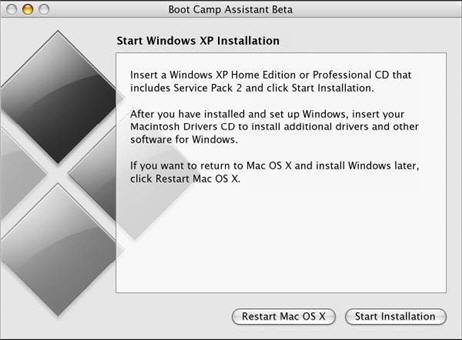
Here are the steps required to install Windows XP on a Mac:

Step 1: Download Mac OS X v10.4.6 (or later) and latest firmware update from Apple Download website.

Step 2: Run the Boot Camp Assistant to create a Macintosh Drivers CD or DVD.

Step 3: Create a new hard-disk partition [minimum size, 5GB] to make room for Windows XP. All the software and data on the original Mac partition stays intact.


Step 4: Insert your Windows XP CD and start the XP installation. Select Partition C: and format the partition using either NTFS or FAT file formats. Though NTFS is more secure than FAT, you won't be able to write or save files to the Windows volume from Mac OS X.

Step 5. Once XP install process is complete, Boot Camp will restart your system in Windows XP automatically. Now is the turn to install Mac Drivers from the Macintosh Drivers CD that you created in Step 2. Restart.

This is an optional step. You can change the Startup Disk preferences page to choose which OS to boot by default. The default OS can also been changed from Windows Control Panel - Performance and Maintenance - Startup Disk.Change the Operating system and Restart.

At startup, hold down the option key (alt) to choose between Mac OS X and Windows.

More Resources on Apple Website:

Apple Boot Camp Homepage | Download Boot Camp [Direct Link]

Download Apple Firmware Update | Mac OS X 10.4.6 for Intel update

Source- www.labnol.blogspot.com